v0.3.0 · MIT · self-hosted
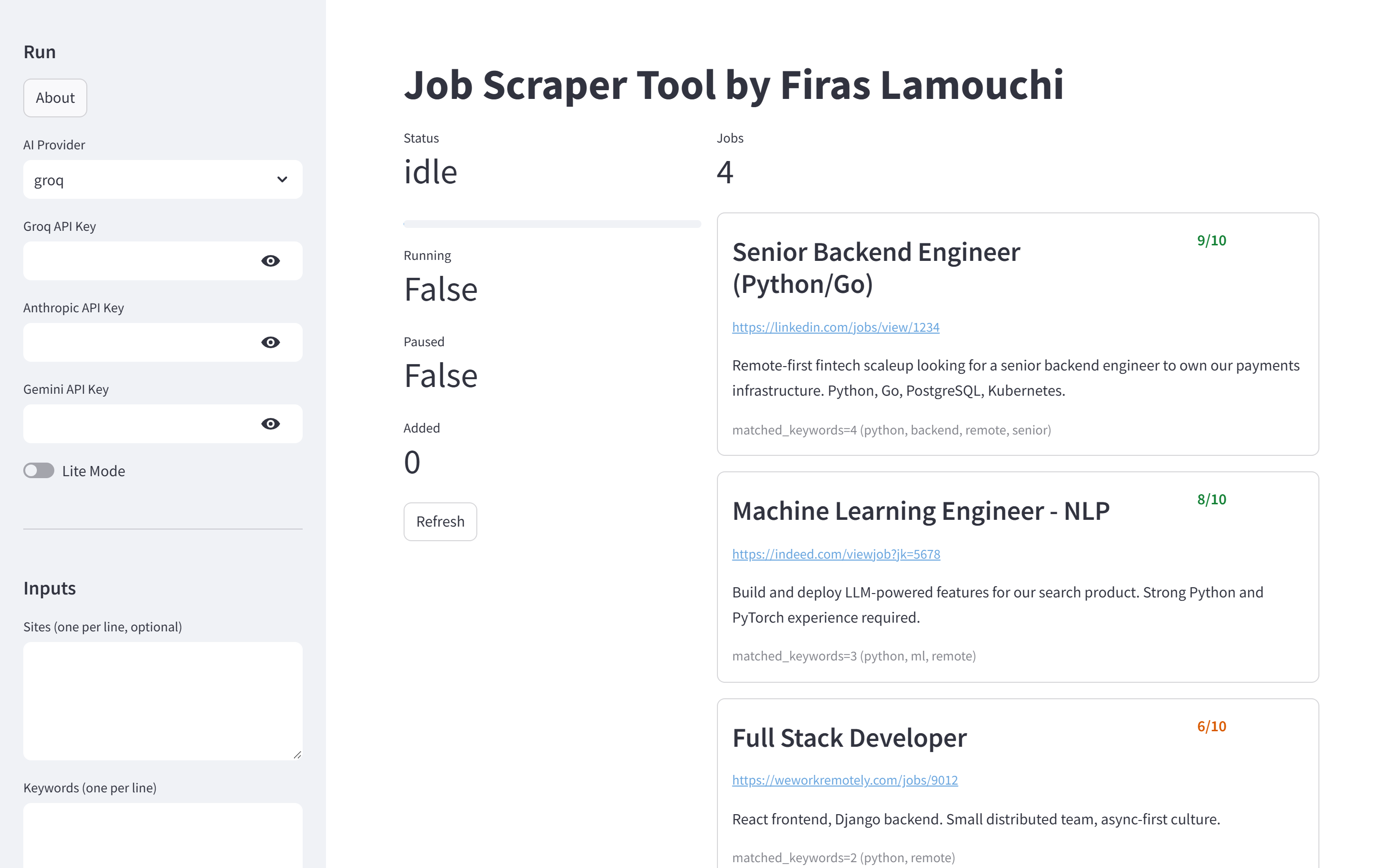
Paste your CV and a few keywords, hit Start. It searches multiple job sites and ranks every result 0–10 by how well it actually matches you — instead of you skimming ten tabs every morning. AI is optional. Your data stays in a SQLite file you own.
# pip install job-scraper02 # docker compose up --build Built while job hunting. It found the job. Now it's good enough for other people to use.
Why this one
Bring a Groq, Gemini, or Anthropic key for AI-scored relevance, or run entirely free in Lite Mode — keyword matching, no key, no signup.
Everything lands in a local SQLite file. Nothing leaves your machine unless you configure an AI key or a notification webhook yourself.
docker compose up --build gives you a dashboard,
a REST API, and a database. No local Python, no dependency hell.
Everything the UI does is also a REST endpoint and a CLI command, so you can wire it into your own automation — or the bundled n8n.
Scoring
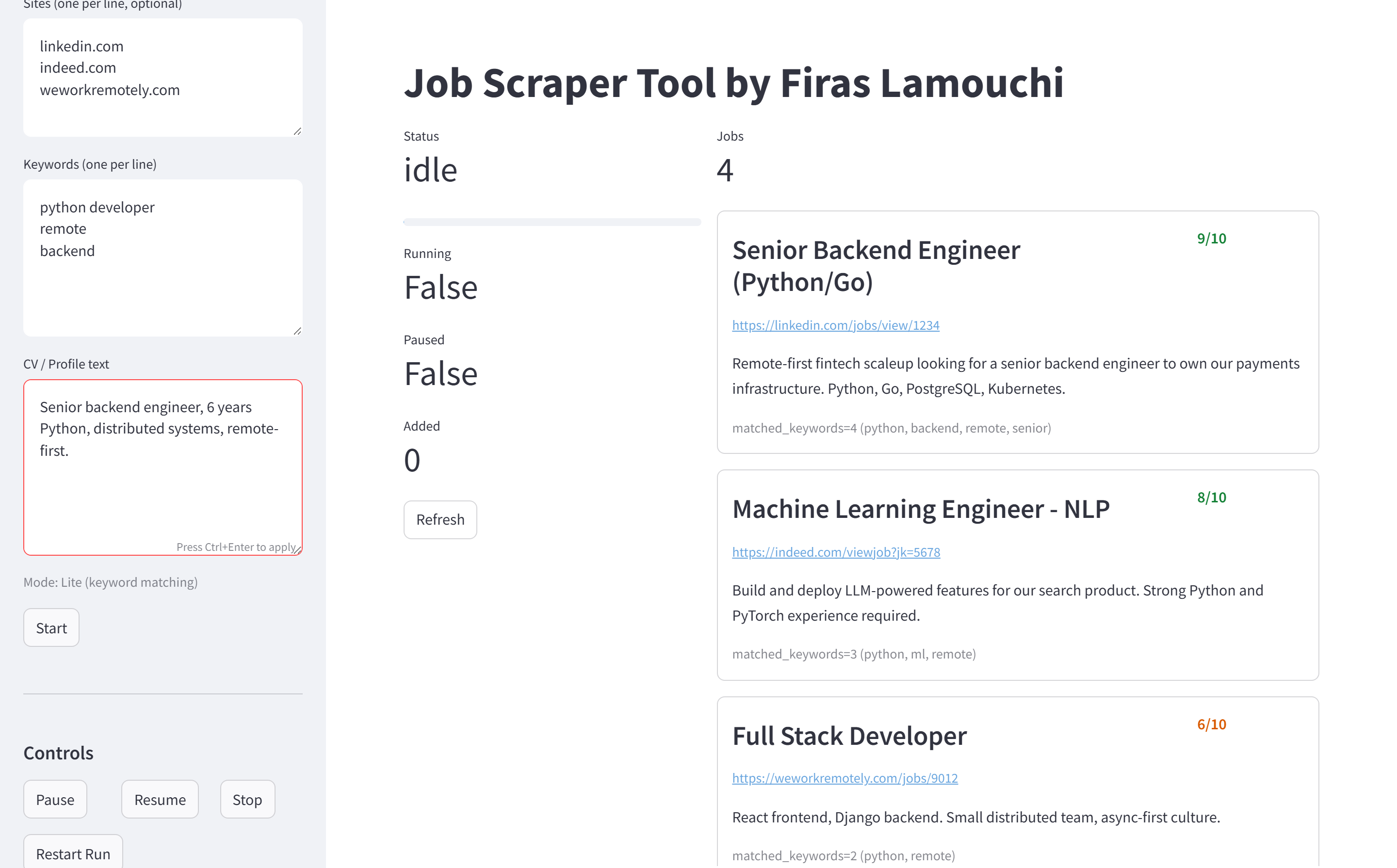
Lite Mode matches your keywords against each listing and scores by overlap. Turn on a provider and every job is read by a model that weighs it against your actual CV and returns a 0–10 plus a one-line reason.
| Provider | Model used | Notes |
|---|---|---|
| Groq | llama3-70b-8192 | fast, generous free tier |
| Google Gemini | gemini-2.0-flash | free tier available |
| Anthropic | claude-3-5-haiku-latest | cheapest Claude |
If a provider call fails or a key is missing, it falls back to Lite Mode for that job rather than dropping it.
Under the hood
For each keyword × site, it runs a DuckDuckGo query and collects the result links. A politeness delay and exponential-backoff retries keep it well-behaved.
Each result page is opened in a real Chromium browser (Playwright) and the job text is extracted — more reliable than raw HTML on JS-heavy boards.
Lite Mode or your chosen model rates the listing 0–10 against your CV and keywords, with a short reason.
Results go into SQLite, de-duplicated by a hash of title + site + link, and served to the dashboard sorted best-score-first.
Run it
The app runs as containers on a Linux host — Playwright, Streamlit and the database all expect it. On Windows use WSL2; on macOS use Docker Desktop or OrbStack. 2 GB RAM minimum, 4 GB recommended.
1 — set your environment
cp .env.example .env Drop in any AI keys you have. None? Lite Mode works out of the box.
2 — spin it up
docker compose up --build 3 — open the dashboard
| localhost:8501 | the dashboard (Streamlit) |
| localhost:8000 | the scraper's REST API (FastAPI) |
| localhost:5678 |
n8n, if you start the automation profile
|
Paste your CV, add keywords like senior python remote,
pick a provider or stay in Lite Mode, hit Start. High-scoring jobs bubble to the top.
# with n8n docker compose --profile automation up # export curl localhost:8000/export/csv > jobs.csv Configuration
| Variable | What it does | Default |
|---|---|---|
| GROQ_API_KEY / ANTHROPIC_API_KEY / GEMINI_API_KEY | AI scoring keys — leave all empty to stay in Lite Mode | empty |
| DATA_DIR | where the SQLite database and logs live | ./data |
| USE_PLAYWRIGHT | fetch result pages with a real browser for better extraction | true |
| REQUEST_DELAY_SECONDS | politeness pause between searches | 0.6 |
| RETRY_MAX_ATTEMPTS | retries on a failed search before giving up | 4 |
| MIN_SCORE_NOTIFY | minimum score (0–10) that triggers a notification | 7 |
| NOTIFICATION_WEBHOOK | POST high-scoring jobs to this URL | empty |
| EMAIL_HOST / EMAIL_PORT / EMAIL_USER / EMAIL_PASS / EMAIL_TO | SMTP for email alerts on high-scoring jobs | empty |
For power users
The Streamlit UI is a client of the FastAPI scraper — you can be one too. There's also a job-scraper CLI on PyPI with run and export subcommands.
| POST | /run | start a run — body sets provider, lite_mode, sites, keywords, cv_text |
| GET | /status | current state, progress, and counts |
| POST | /pause | pause the running job |
| POST | /resume | resume a paused job |
| POST | /stop | stop the run |
| GET | /export/csv | all jobs as CSV, best score first |
| GET | /export/json | all jobs as JSON |
curl -X POST localhost:8000/run -H 'Content-Type: application/json' -d '{"provider":"groq","lite_mode":true,"keywords":["python"],"cv_text":"developer"}' Deploy
The default. Two images are published to GHCR —
job-scraper02/scraper and
job-scraper02/ui — so a plain
docker compose up pulls instead of builds.
railway.json and
render.yaml are in the repo — point the platform
at your fork and set your keys.
Packaging: v0.3.0 is on PyPI via a Trusted Publisher pipeline. CI installs the built wheel and drives a real scrape against live containers on every push — 26 tests, not just a type check.
Before you ask
Contact
Questions, ideas, a bug, or you want to help build it — this goes straight to Firas's inbox and you'll get an auto-reply to confirm.